
 EN
EN'%20transform='translate(80)scale(.9375)'%3e%3cpath%20fill='%23da251d'%20d='M-128%200h768v512h-768z'/%3e%3cpath%20fill='%23ff0'%20d='M349.6%20381%20260%20314.3l-89%2067.3L204%20272l-89-67.7%20110.1-1%2034.2-109.4L294%20203l110.1.1-88.5%2068.4%2033.9%20109.6z'/%3e%3c/g%3e%3c/svg%3e) Tiếng Việt
Tiếng Việt '%3e%3cpath%20fill='red'%20d='M0%200h720v480H0z'/%3e%3cpath%20fill='%23000095'%20d='M0%200h360v240H0z'/%3e%3cg%20fill='%23fff'%3e%3cpath%20d='m154%20126.9-2.5%209.6%209.4%202.6-1.8-7.1zm46.9%205.1-1.8%207.1%209.4-2.6-2.5-9.6zm-41.8-24-5.1%205.1%201.9%206.9z'/%3e%3cpath%20d='m155.9%20120-1.9%206.9%205.1%205.1z'/%3e%3cpath%20d='m154%20113.1-6.9%206.9%206.9%206.9%201.9-6.9zm14%2027.8%205.1%205.1%206.9-1.9zm18.9%205.1%209.6%202.5%202.6-9.4-7.1%201.8z'/%3e%3cpath%20d='m192%20140.9%207.1-1.8%201.8-7.1zm-31.1-1.8%202.6%209.4%209.6-2.5-5.1-5.1zm19.1%205%206.9%201.9%205.1-5.1z'/%3e%3cpath%20d='m173.1%20146%206.9%206.9%206.9-6.9-6.9-1.9zm-12.2-45.1-9.4%202.6%202.5%209.6%205.1-5.1zm-1.8%2031.1%201.8%207.1%207.1%201.8zm45-12%201.9-6.9-5.1-5.1z'/%3e%3cpath%20d='m168%2099.1-7.1%201.8-1.8%207.1zm32.9%208.9-1.8-7.1-7.1-1.8zm5.1%2018.9%206.9-6.9-6.9-6.9-1.9%206.9z'/%3e%3cpath%20d='m200.9%20108-8.9-8.9-12-3.2-12%203.2-8.9%208.9-3.2%2012%203.2%2012%208.9%208.9%2012%203.2%2012-3.2%208.9-8.9%203.2-12z'/%3e%3cpath%20d='m200.9%20132%205.1-5.1-1.9-6.9zm5.1-18.9%202.5-9.6-9.4-2.6%201.8%207.1zm-6.9-12.2-2.6-9.4-9.6%202.5%205.1%205.1zm-26-6.9-9.6-2.5-2.6%209.4%207.1-1.8zm6.9%201.9-6.9-1.9-5.1%205.1z'/%3e%3cpath%20d='m186.9%2094-6.9-6.9-6.9%206.9%206.9%201.9z'/%3e%3cpath%20d='m192%2099.1-5.1-5.1-6.9%201.9zM173.1%20146l-9.6%202.5%204.5%2016.6%2012-12.2zm-5.1%2019.1%2012%2044.9%2012-44.9-12-12.2zm-7.1-26-9.4-2.6-4.4%2016.4%2016.4-4.4z'/%3e%3cpath%20d='m147.1%20152.9-12%2045.1%2032.9-32.9-4.5-16.6zm-12-20.9L102%20165.1l45.1-12.2%204.4-16.4z'/%3e%3cpath%20d='m154%20126.9-6.9-6.9-12%2012%2016.4%204.5zm0-13.8-2.5-9.6-16.4%204.5%2012%2012z'/%3e%3cpath%20d='M135.1%20108%2090%20120l45.1%2012%2012-12zm90%2024-16.6%204.5%204.4%2016.4%2045.1%2012.2z'/%3e%3cpath%20d='m199.1%20139.1-2.6%209.4%2016.4%204.4-4.4-16.4zm-12.2%206.9-6.9%206.9%2012%2012.2%204.5-16.6zm19.1-19.1%202.5%209.6%2016.6-4.5-12.2-12z'/%3e%3cpath%20d='m192%20165.1%2033.1%2032.9-12.2-45.1-16.4-4.4zm7.1-64.2%209.4%202.6%204.4-16.4-16.4%204.4z'/%3e%3cpath%20d='M225.1%20108%20258%2075.1l-45.1%2012-4.4%2016.4zm-12.2-20.9L225.1%2042%20192%2075.1l4.5%2016.4zm12.2%2044.9%2044.9-12-44.9-12-12.2%2012z'/%3e%3cpath%20d='m206%20113.1%206.9%206.9%2012.2-12-16.6-4.5zm-38-38L135.1%2042l12%2045.1%2016.4%204.4z'/%3e%3cpath%20d='m160.9%20100.9%202.6-9.4-16.4-4.4%204.4%2016.4z'/%3e%3cpath%20d='m147.1%2087.1-45.1-12%2033.1%2032.9%2016.4-4.5zm39.8%206.9%209.6-2.5-4.5-16.4-12%2012z'/%3e%3cpath%20d='M192%2075.1%20180%2030l-12%2045.1%2012%2012z'/%3e%3cpath%20d='m173.1%2094%206.9-6.9-12-12-4.5%2016.4z'/%3e%3c/g%3e%3ccircle%20cx='180'%20cy='120'%20r='51.1'%20fill='%23000095'/%3e%3ccircle%20cx='180'%20cy='120'%20r='45.1'%20fill='%23fff'/%3e%3c/g%3e%3c/svg%3e) 繁體中文
繁體中文  ภาษาไทย
  Bahasa Indonesia

Why watching movies alone does not make you better
Watching with subtitles is fun, but most of the time your eyes read the translation and your ears just drift. For a movie to really teach you English, you have to stop at each sentence, understand it and say it back.
Cinema: a feed of short clips
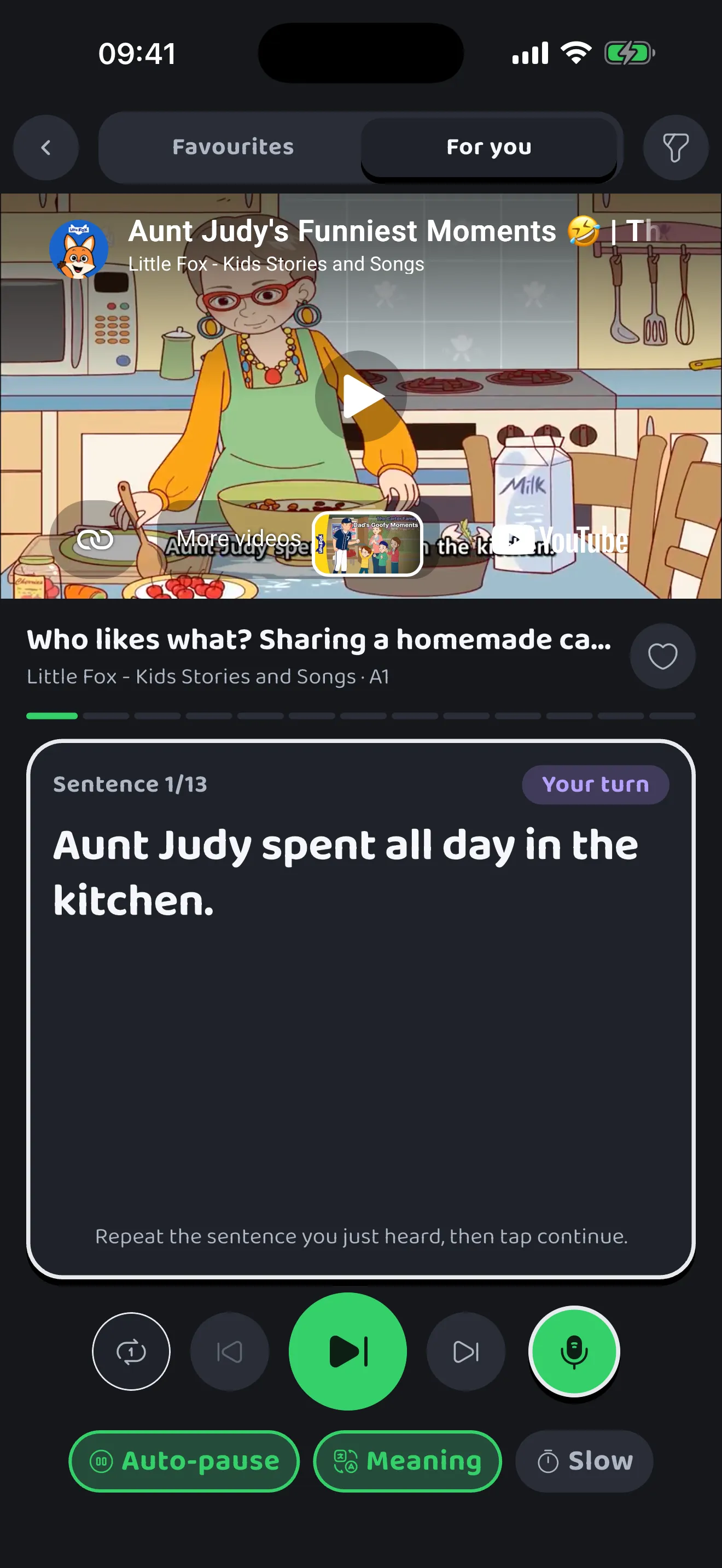
- Swipe up like short videos, each clip a few dozen seconds cut from a real video.
- Subtitles appear one sentence at a time below the video, with the meaning in your language.
- Auto-pause after each sentence so you can repeat it, then it plays on.
- Tap a missed word to see what the app heard you say.
- Save favourite clips to practice them again.
Library: videos of 2 to 5 minutes
Once short clips feel easy, the library has longer videos, still short enough to finish in one go. Subtitles follow the video, and tapping a sentence replays it. The app keeps your best try at each sentence so you can hear your own voice again.
How to learn English with movies effectively
- Watch once for the gist, reading the meaning if you need it.
- Go through it sentence by sentence, listening for linking and intonation.
- Repeat each sentence out loud (shadowing) until you keep up with the speed.
- Save the sentences you can use in real life, and use them in conversations.